EaseePlay

Project Size
3 members
Role
UI/UX Designer & UX Researcher
Duration
36 hours
Type
CreateSC Design-a-thon
Overview
With the meaning of “play with ease, easy to play”, EaseePlay is a video game recommendation app that prioritizes accessibility settings for those with special needs.
Developed during a 24-hour design-a-thon, the time constraint challenged me and my team to efficiently address a prevalent problem within a tight timeframe.
Prompt Introduction
"Develop a mobile application platform aimed at enhancing accessibility and enriching the entertainment experience for individuals needing medical accommodations."
Design Process Timeline

Brainstorming Topics
We began brainstorming popular entertainment sector to touch base with different topics. Essentially, we focused on what the different platforms could be especially challenging for those needing medical accommodations.

Research Approach
Secondary Research
We decided to choose the topic of video games, hence this marketing being the most rapidly growing, widely popular surfaces worldwide.
Compound annual growth rate of 13.4 percent from 2023 to 2030.
Rise from $262 billion in 2023 to $312 billion in 2027.
Rising technology usage (mobile phones) -> captivating to wide audience.
Research Questions
We established three research questions to gauge a deeper understanding of how accessibility applies to video games.
This made video games a medium to address accessibility needs, especially realizing that a wide market means a wide audience pool.
Why should accessibility accommodations be prioritized in video games?
What are the common accessibility challenges faced by gamers?
How are individuals with disabilities accommodated in the video game world?
Understanding the Problem
Starting our research, our goal was to look deeper into the barriers that players might face. We considered various types of disabilities including visual, motor, and auditorial.
We put an emphasis on researching disabilities that can hinder video game performance:
Colorblindness
12 million people in the U.S.
Importance
Colors are used to convey important game queues: distinguishing enemies.
Hard of Hearing
11 million people in the U.S.
Importance
Navigating across hearing-reliant gameplay: enemy positioning in FPS games.
Motor Disabilities
Motor disabilities (including Cerebral Palsy) ~ 1 million people in the U.S.
Importance
Games that require precise button-play and input.
What settings are already available?
We focused on what already exists and how they improve game's playability and enjoyability, relating back to our research question 2 of: What are the common accessibility challenges faced by gamers?
Colorblind Mode
Changes the game’s color palette to better distinguish units.
Subtitle Customization
Adjustable font size and helpful for unpredictable audio.
Customizable Controls
Adjustable game controls to better accustom for preference.
Primary Research: Quantitative Data
We first decided to send surveys for quantitative data to help us identify common pain points, preferences, and behaviors related to accessibility in gaming. We sent out our surveys to multiple Discord servers, targeting a diverse community of gamers to gather baseline data which helped us identify trends and patterns to a wide group of users.
Key Survey Questions
What factors influence your decision when choosing a new game?
What purpose do you play video games for?
Are you familiar with the various accessibility settings provided in a video game?
If yes, which settings do you use?
If applicable, are there challenges you face when playing a video game due to the lack of in-game settings?
Have you ever used third-party tools or mods to improve a game’s ease-of-use or accessibility?
Our questions focused on the player’s decision and factors of gaming, their awareness and use of accessibility features and finally if they were using workarounds of inconvenience and challenges due to possible lack of settings.
Survey Takeaways
The majority of gamers are initially unfamiliar with accessibility settings, but actively seeks ways to enhance their experience.
Out of the 29 respondants…
57% of gamers were unfamiliar with various in-game accessibility settings.
This indicates that there is a gap in the visibility of the features provided in video games. This highlights the need for better initial resources.
However, 43% of gamers use mods to improve gameplay and 71% of individuals use or change in-game settings.
Even though gamers are unfamiliar with built-in accessibility settings, a majority of them seek customization options. Adjusting options and accessibility settings is an action that many take on.
With the results of our survey, it is evident that there could be methods to improve the introduction of accessibility in games, especially to those who need them for guidance.
Qualitative Data: Interviews
Key Interview Questions
Have you experienced multiple accessibility settings in games being helpful to your overall performance?
How important are colorblind modes or alternative visual cues when choosing a game?
How do you adapt when a game does not have colorblind-friendly settings or gameplay?
Are there specific games or genres that you find particularly difficult to play due to being color blind?
Interview Takeaways
Through this interview, we uncovered the pain points and flaws in video games, especially for those with colorblindness.
“I wish there were alternatives for distinguishing in-game teams.”
Games tha rely on colors for distinguishing teams, hinders their overall performance due to mix-ups of similar colors. When it comes to distinguishing teams, names and shapes is a better alternative, if color-blind mode is not an option.
“Even if I don’t necessarily need an accessibility setting, I still find them useful.”
When it comes to the closed caption setting in games, they find it helpful even if they don’t necessarily rely on them. Especially with games themed around storytelling and dialogue, they find using closed-captions are helpful when trying to follow the plot.
Solution Strategy
Design Questions
After research, we concluded that there exists a gap between accessibility and gamers being aware of possible settings and accommodations. We constructed a design question of: How might we design an app that bridges the gap between players and in-game accessibility features to create a more inclusive gaming experience? to increase awareness.
Potential Solutions
A potential solution that we came up with was to create a game discover or recommendation platform that helps players find games based on accessibility needs. Based on our research, many players with disabilities struggle to find games that accommodate their needs, due to a lack of information prior to downloading or purchasing the game. Especially knowing how everyone’s background is different, we wanted to create an app that is specifically catered to how users can easily find suitable games based on their needs.
User Persona
Creating Kurtis’s persona involved researching the challenges faced by gamers with disabilities. Based on our interviews and surveys, creating Kurtis’s persona helped ensure that our design solutions were grounded in real, relevant user needs.

Competitive Analysis
We conducted a competitive analysis to see what worked and what could be improved. We discovered that there are no apps that recommends games based on accessibility, and in fact, there were no mentioned of accessibility features in games at all. However, there were common patterns of rating video games and socializing with others.

Design Goals & Solutions
We had three solutions and design goals to create a more enjoyable gaming experience for individuals like Kurtis.
Emphasize and notify users of available accessibility settings.
Recommend suitable video games based on preference & accomodations.
Create a close community of similar groups of users to socialize.
Focus on Business Objectives
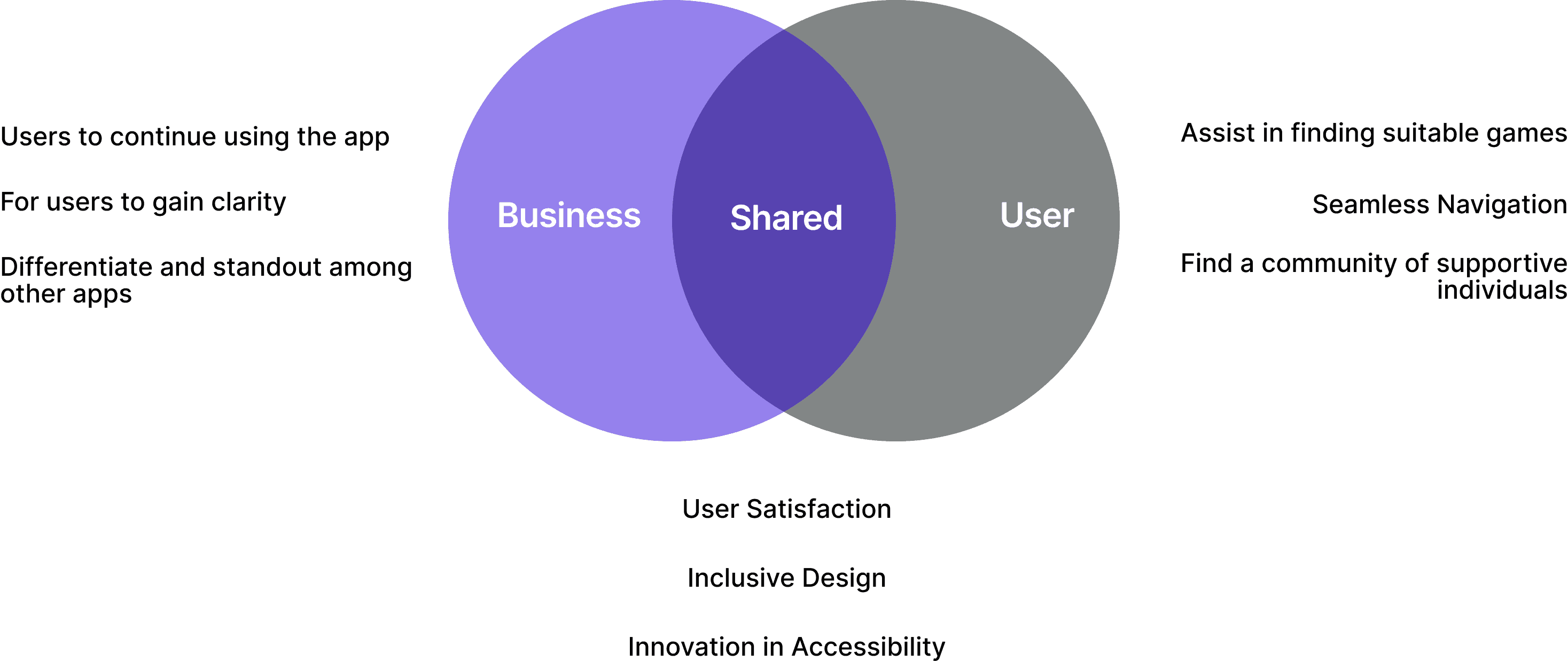
Our work thus far has been user focused, but we wanted to align with business objectives as well. Along with user objectives, we wanted business goals like users continuing to use the app and differentiating with competitors.
Design
User Flow
We created a user flow to help us visualize how users might interact with the app, ensuring that the journey is especially usable and engaging. Mapping this flow helped us visualize the pain-points of individuals with disabilities, and how their needs could be optimized with a straight forward usability.

Low-Fidelity Wireframes
We sketched our initial frames with the core features in mind. Our main focus of the sketches was to keep a simple UI layout, especially due to our targeted audience group. We brainstormed various ways of how the users can to their preference without any confusion, and display necessary game recommendations following right after.

High Fidelity Testing & Feedback
With our first high-fidelity mockup, we conducted a user testing session with interactive prototypes to gather detailed feedback on the look, feel and functionality of our app. We performed an online testing session with our color-blind friend and managed participant expectation by emphasizing how this testing session is important to understand user pain-points, and set ourselves as an observer.
The scenario that we gave to our friend was to: imagine that you first encounter this app to find new games that are suitable for your needs. We gained the following feedback:
The colors seem like they don’t fit the video game aesthetic
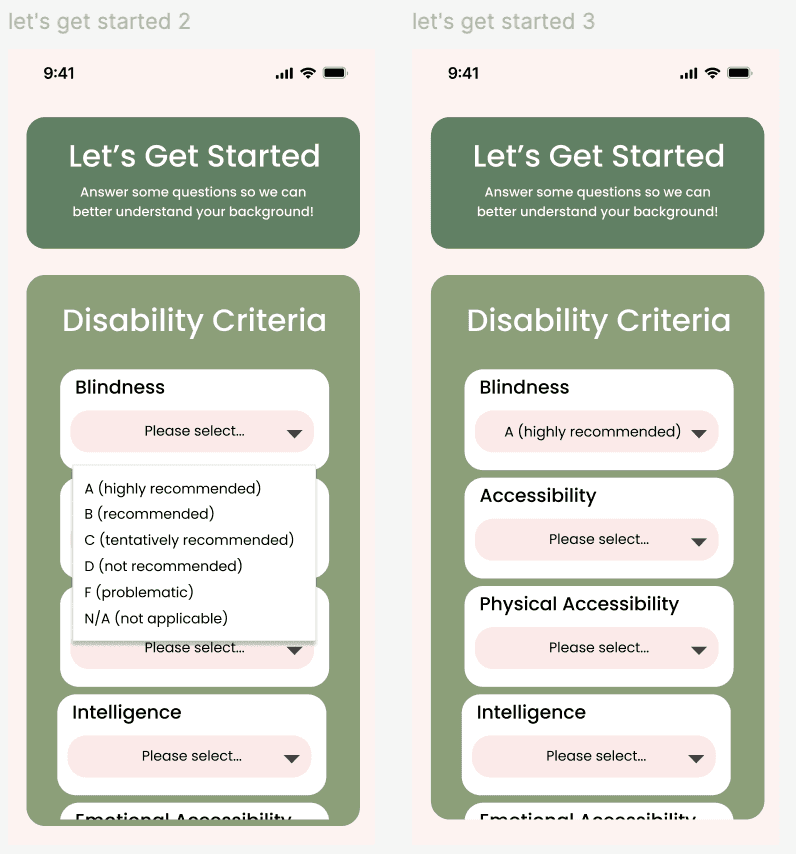
The drop down menu for selecting criteria seems crammed.
Emphasize more of the accessibility in the game recommendations screen.


UI Brand Kit & Style
Based on the user testing feedback, we first altered our brand kit and colors to fit a more retro video game look, with no overwhelming or confusing colors like the pink and green. We opted for a dark, vibrant blue for buttons, to indicate that these features are interactive. We also decided on the name of "EaseePlay" to encourage users that gaming can be done with ease.

Color Contrast
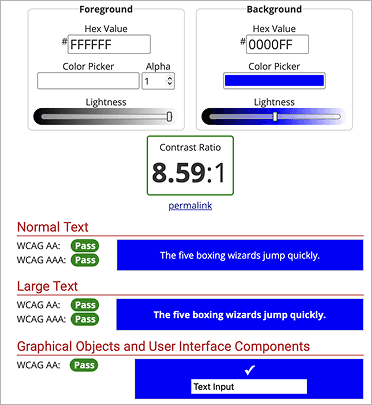
As EaseePlay’s audience is for those needing accessibility accommodations, we made extra efforts to ensure our app is easy to navigate and accessible. We did this is by using WCAG’s color contrast checker. By doing so, we double checked to verify that our texts were readable and the background didn’t overpower the font color. This would allow users, including those with visual disabilities, to perceive the content that is shown.

High-Fidelity Wireframes

Select Needed Accomodations
Users rank their comfort level with each disability criteria.
Users select their preferred game genre.
EaseePlay recommends appropriate matches.
Like or Dislike Recommendations
EaseePlay recommends suitable video games.
Accessibility tags are shown first, followed by screenshots and ratings from the community.


Rate Your Experience
Users have the option to rate their experience based on the game itself and its accessibility.
Confirming accessibility tags verifies that the accessibility features exist in the game.
This is based on the user's first-handed experience.
Key Takeaway & Impact
What did you learn?
During this project, I learned the methods of how accessibility can be incorporated in application design. For example, I learned about different design methods like the bottom sheet option for screen reader users. I also learned to work in a tight, 48-hour time frame and conduct necessary research to really understand the user needs. Thus, iterating through designs and making these choices by collaborating with my teammates also drove me to communicate efficiently.
What would you do differently?
In this project, it would've been interesting to see a mix of multiple entertainment platforms (like games and music), especially because we had various ideas when we were first brainstorming. Thus, gaining more insight on first-handed experience to better improve our app's user experience would be something I would've improved on. Finally, using a more variety of research methods, like tree testing to evaluate hierarchy of information and findability, would be something new I would incorporate as well.
What were the obstacles?
One of the biggest challenges was balancing both aesthetics and accessibility to our app design, especially rethinking the color palette to still be engaging, but maintaining a simple look. Thus, recruiting the right demographic for our user interview was challenging as well. In the future, I would love to reach out to disability advocacy groups to find a more diverse pool of individuals.